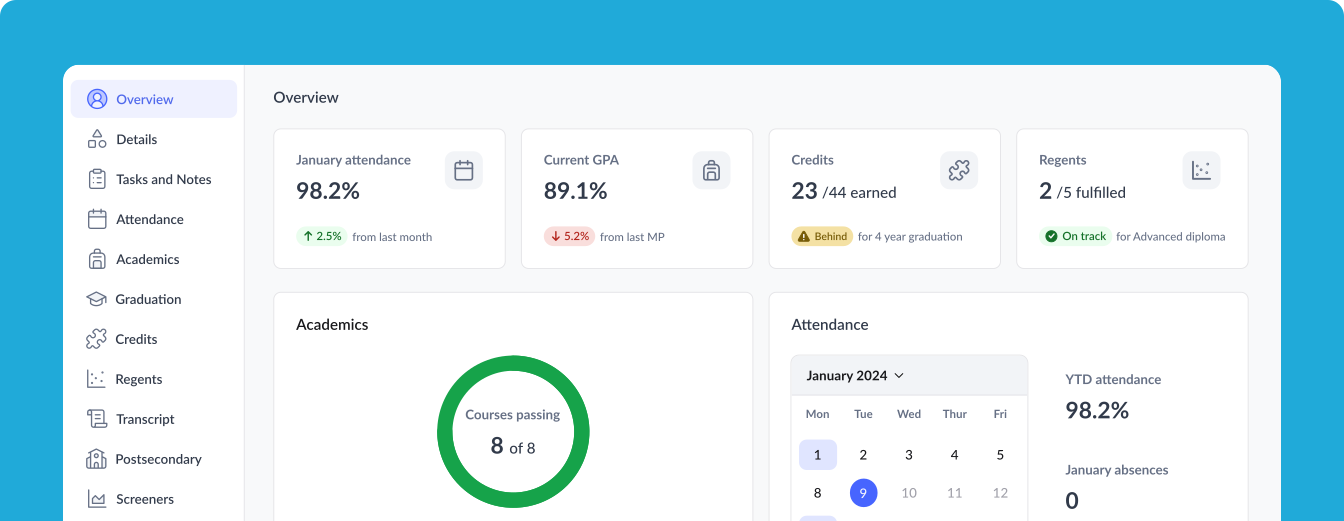
From data silos to quick insights: Launching a new student overview panel
TL;DR
The challenge: Teachers were spending 5-10 minutes per student clicking through multiple data panels just to answer basic questions like "How is this student doing overall?
My solution: Designed a student overview panel that synthesizes key insights from across main intervention areas, including attendance patterns, academic progress, graduation requirements, and intervention data—in one scannable view.
The impact: 150% increase in student profile page views, and 40% increase in daily active users on this page, and 28% growth in monthly active users.
Key innovation: Created a skeleton loading system that became a reusable pattern adopted across 5 other Portal features, solving performance constraints while enhancing user experience.
My role
Lead Product Designer working directly with engineering, product management, and 8 NYC educators. I owned the end-to-end design process from research through implementation over 3 months.
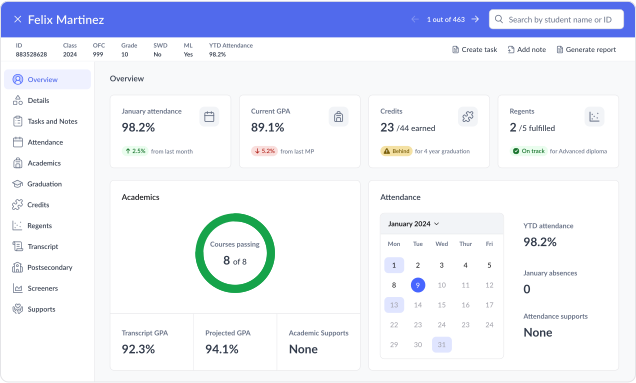
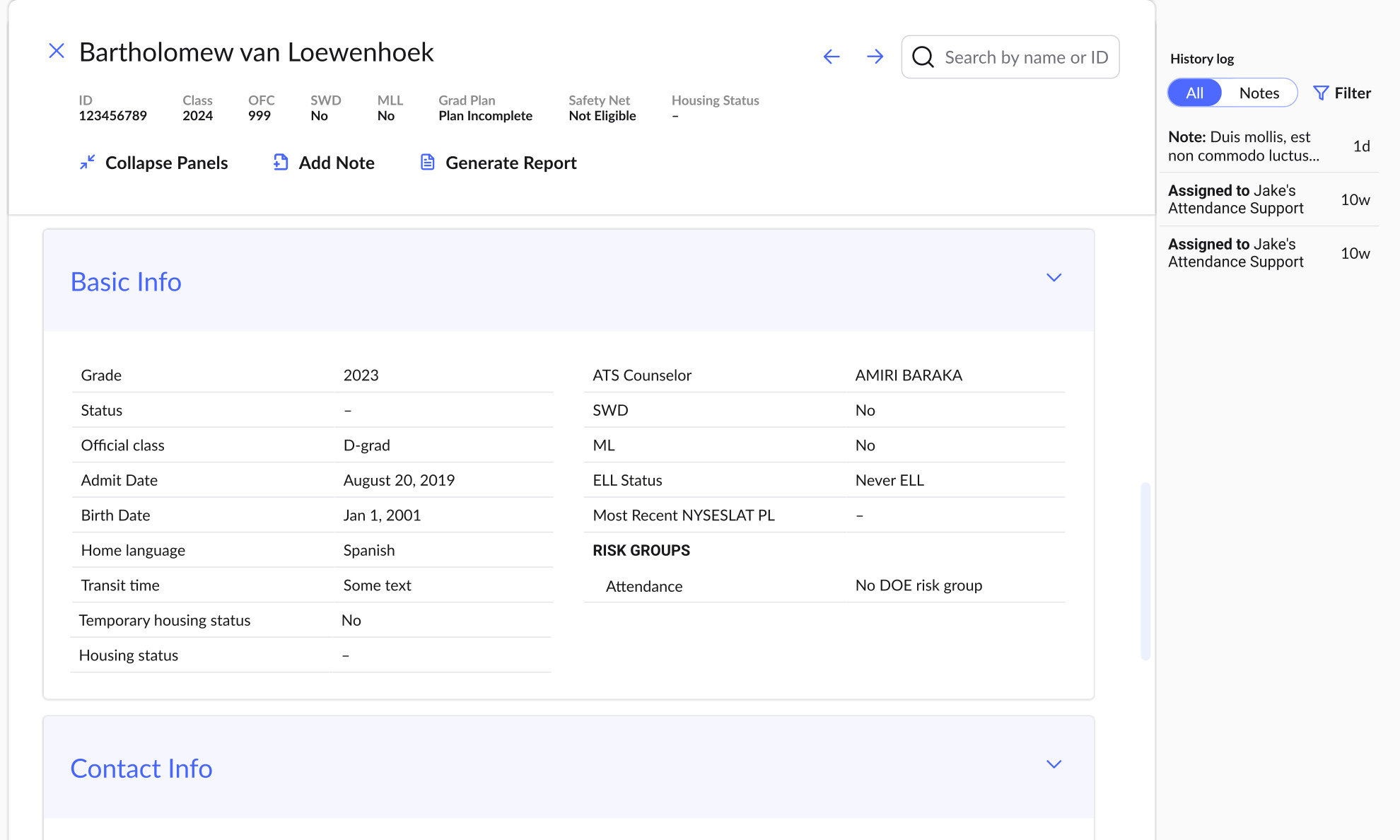
Before and after of the student profile page
Scroll to learn more

01Uncovering the real problem
During contextual inquiry with 8 NYC educators, I observed teachers spending 5-10 minutes per student jumping between panels just to answer "How is this student doing overall?" Analytics confirmed this pattern: 73% of users accessed 3+ panels per student session, following the same inefficient sequence every time.
As I was already redesigning the student profile's navigation layout to improve information hierarchy, the real insight came from watching their workflow—teachers weren't struggling with navigation alone, they were struggling to synthesize scattered data into actionable insights for parent conferences. This led me to propose adding a new overview panel to the redesigned profile.
“I need to click through 4 different sections just to get the full picture before a parent conference.”
- From a conversation with a frequent Portal user

02The wrong solution (and learning from it)
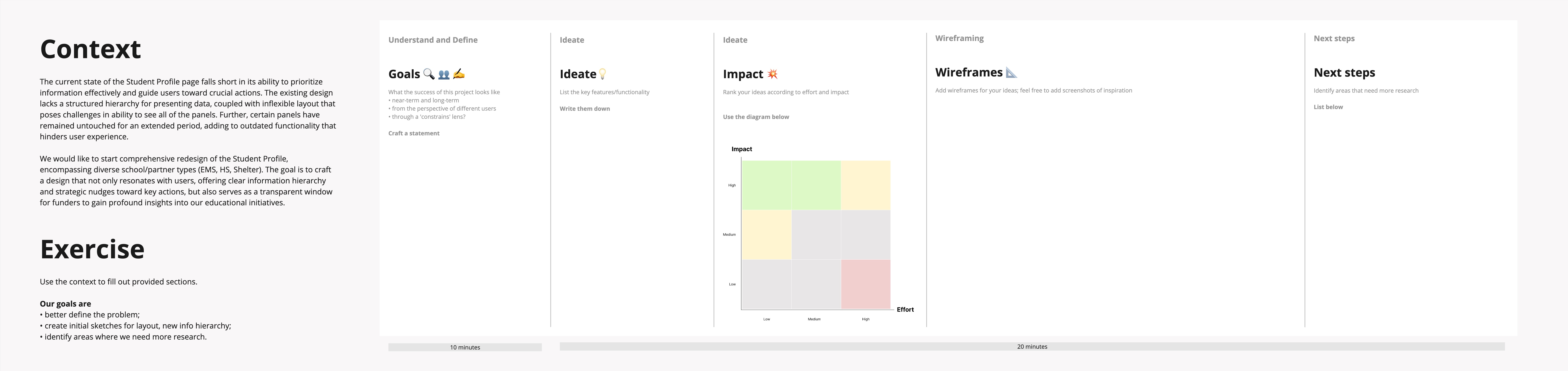
Given carte blanche to create a dashboard-like summary, I initially created wireframes with 6+ modules, basing the selection of data points on Mixpanel data and stakeholder requests. After faciliating a design review with key stakeholders, I received feedback that this approach was comprehensive but unfocused.
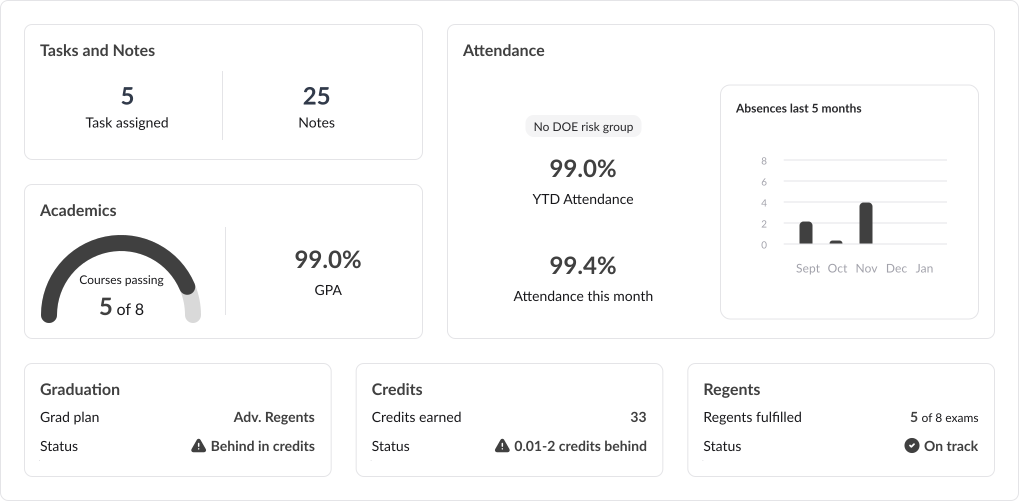
“Teachers don't need more data to look at. They need help understanding what it means for each student.”
- From a stakeholder during design review
03Strategic focus over feature bloat
Another obstacle emerged when each product team wanted their metrics featured prominently in this new summary panel.
I facilitated alignment workshops with product managers across 5 different teams and as a team, we established that this panel should "tell the student's educational journey" and provide "actionable information" for next steps. This became my design criteria.
The collaborative breakthrough was establishing that this panel shows highlights for quick student risk assessment, with each module clickable to access their team's detailed information in dedicated panels. This approach honored everyone's needs while serving our users.
04Back to the drawing board
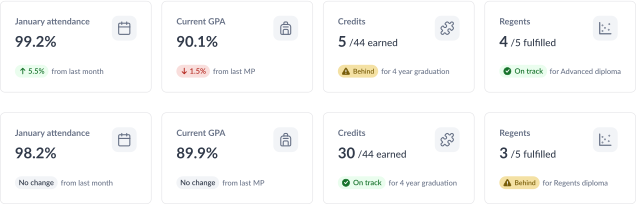
With this foundation, I could redesign with clear purpose. After extensive stakeholder conversations across multiple teams, we landed on 4 core modules that balanced immediate insight with actionable context: current month attendance, current GPA, credits earned, and regents fulfilled.
Each module follows the same pattern with the primary metric at top and a contextual change indicator below, because users needed both "where the student stands now" and "which direction they're trending."
The month-over-month and marking period comparisons came from user research showing that static numbers felt meaningless without context. The graduation tracking statuses addressed counselor workflows around intervention timing. This structure gives educators the snapshot they need while showing whether each area requires immediate attention.
05Validation and refinement
I tested the 4-module concept with 5 teachers using realistic student data. Results were clear: 60% reduction in assessment time and increased exploration of detailed information. When stakeholders pushed for progress bars in the 4 modules and additional data visualizations, inspired by the visual elements I'd successfully introduced elsewhere in the panel, I used this validation data to advocate for strategic focus.
The compromise was adding progress bars to the respective detailed panels where there's room to explain their complexity, while keeping the overview modules simple.
We also replaced the attendance graph with an interactive attendance calendar, addressing their preference for more visual data representation while maintaining core simplicity, since user research showed school staff needed to quickly identify attendance patterns that could inform intervention decisions.

Some stakeholders pushed for progress bars in the top 4 modules
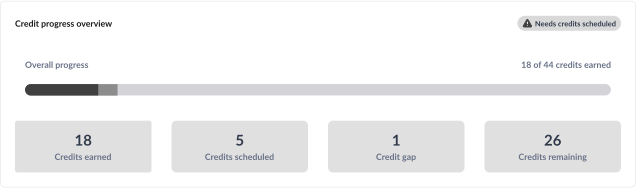
Compromise was to add progress bars to the respective panels instead
06Solving the performance challenge
Engineering flagged a critical issue: the new overview panel required loading data from 4 different backend systems simultaneously (8+ API calls) versus existing on-demand loading. On school Chromebooks, this meant 5+ second load times that would lose users entirely.
I proposed skeleton loading for the entire overview panel. Users see the full structure with animated placeholders while data loads. I created design documentation defining skeleton states for different content types, establishing shared language between teams.
The solution was so effective that these skeleton loading components now serve 5 different Portal features and established design patterns for new features across the platform
07The final solution
Two new data visualizations were introduced as a apart of this work. One is the interactive calendar widget, which shows daily attendance patterns because visual patterns reveal insights that percentages hide.
Teachers can instantly identify concerning patterns—like every Monday absence suggesting weekend issues, or absences clustered around test dates. This helps them distinguish between students needing family support versus academic intervention.
For the academics section, I coordinated with the data team to establish a traffic light color system (green/yellow/red) for courses passing, making intervention needs instantly recognizable. We designed graceful fallback states for edge cases like beginning of year when grades aren't yet available, showing "In Progress" rather than confusing empty states.
The supporting modules provide detailed context while maintaining our principle of actionable information. Each element guides educators toward next steps rather than just displaying comprehensive data.
The final design consolidates the four most critical data points teachers need: attendance patterns, academic performance, graduation progress, and state testing requirements—all in one scannable view.
08Impact
Results after 6 months:
0%Increase in student profile page views
0%Increase in daily active users on this page
0%Growth in monthly active users
- Systems-level impact:
- Data visualization patterns I introduced were adopted across 6 different product areas
- Established the design language for how we present complex educational data platform-wide
- Became the most requested feature demo for new district onboarding
“I can answer parent questions immediately now instead of saying 'let me look that up.”
- From a conversation with a frequent Portal user
09Key takeaways
Stakeholder alignment is as important as user research.
Getting 5 product teams to agree on design criteria took just as much effort as the actual design work. I learned that framing decisions around shared goals ("tell the student's educational journey") worked better than trying to convince teams my approach was right.
Data builds consensus that opinions can't.
When stakeholders wanted more complexity, showing them that teachers completed tasks 60% faster with the simple version aligned everyone around the focused approach. User testing became my best tool for organizational alignment, not just design validation.
Good solutions create ripple effects.
The skeleton loading system we built to solve our performance problem became a reusable pattern adopted by 5 other teams. This taught me that addressing immediate constraints thoughtfully can drive platform-wide improvements.
Next Project
The feature users loved to leave: Redesigning the data grid to stop spreadsheet exodus
